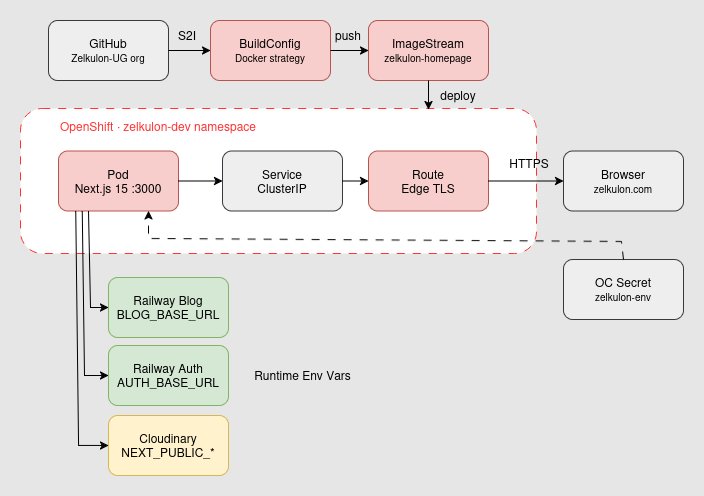
Netlify did nothing wrong. But I wanted to know what real Kubernetes control feels like. 30 days of OpenShift Developer Sandbox, a faster website – and the honest answer why we stayed where we were.
Why OpenShift – and why go back?
Netlify did nothing wrong. Neither did Railway. But I wanted to know what it feels like to have real control – no push-and-deploy magic, no abstraction on top of abstraction. OpenShift Developer Sandbox is free, runs on Kubernetes, and it took me half a day to get the first Next.js page up. This article is what I wish I had before starting.
The next step: migrating the Spring Boot microservices from Railway to OpenShift. But first, the frontend had to work.
The nginx Trap: No Root on OpenShift
The first attempt was a standard nginx container. OpenShift killed it immediately. No helpful error, just CrashLoopBackOff. The reason: OpenShift does not allow root containers by default. nginx runs on port 80, and port 80 requires root. On normal servers that is fine – on OpenShift it is a showstopper.
OpenShift Security Context Constraint (SCC)

  Standard nginx (Port 80, root)
  ─────────────────────────────
  Container startet → OpenShift prüft SCC
  → User 0 (root) verboten
  → CrashLoopBackOff ✗

  nginxinc/nginx-unprivileged (Port 8080, non-root)
  ──────────────────────────────────────────────────
  Container startet → OpenShift prüft SCC
  → Non-root User ✓
  → Pod läuft ✓
⚠ CrashLoopBackOff on first deploy
Problem: Standard nginx runs as root (port 80) – OpenShift forbids root containers by default.
Fix: Use nginxinc/nginx-unprivileged:alpine. Runs on port 8080, no root required.
# Falsch – schlägt fehl auf OpenShift:
FROM nginx:alpine

# Richtig – rootless, Port 8080:
FROM nginxinc/nginx-unprivileged:alpine
Connecting a Private GitHub Repository
OpenShift cannot simply access a private GitHub repository. A Personal Access Token is not enough – the secret must also be annotated so OpenShift automatically associates it with the correct URL.
# 1. Secret mit GitHub Personal Access Token anlegen
oc create secret generic github-secret \
  --from-literal=username=<github-username> \
  --from-literal=password=<github-PAT> \
  --type=kubernetes.io/basic-auth

# 2. Secret annotieren – OpenShift nutzt es automatisch für die URL
oc annotate secret github-secret \
  "build.openshift.io/source-secret-match-uri-1=https://github.com/<username>/*"

# 3. Builder-ServiceAccount bekommt Zugriff
oc secret link builder github-secret
✓ Annotating the secret is mandatory
A GitHub secret without annotation does not apply automatically. The annotation build.openshift.io/source-secret-match-uri-1 links the secret to the correct Git URL – only then does the clone succeed.
Dockerfile for Next.js: Multi-Stage and Standalone
A regular Dockerfile would produce a huge image – node_modules alone are hundreds of megabytes. Multi-stage builds solve this: the build stage compiles, the runtime stage copies only the result.
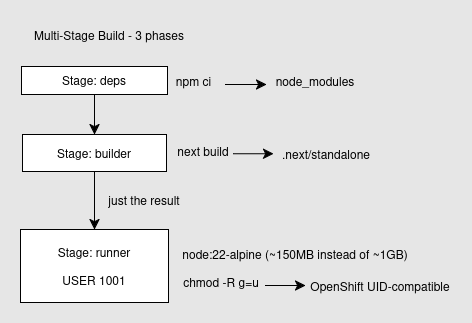
The key is output: "standalone" in next.config.ts. Next.js then bundles only the actually imported dependencies into .next/standalone – no node_modules needed in the final image.
# next.config.ts – eine Zeile entscheidet alles:
output: "standalone"

# Das Ergebnis: .next/standalone enthält nur was wirklich gebraucht wird.
# Kein node_modules im finalen Image – spart ~800MB.
✓ output: standalone saves ~800MB
Without standalone the Dockerfile copies the entire node_modules directory into the final image. With standalone only the .next/standalone folder is needed – Next.js has already embedded all required dependencies.
The NEXT_PUBLIC_* Trap: Build Time vs. Runtime
This was the most expensive mistake in terms of time. Next.js strictly distinguishes between variables that are frozen at build time and variables evaluated at runtime.
NEXT_PUBLIC_* – die Falle

  Build-Zeit                    Runtime
  ──────────────────────────    ──────────────────────────
  NEXT_PUBLIC_SITE_URL          BLOG_BASE_URL
  NEXT_PUBLIC_BLOG_BASE         AUTH_BASE_URL
  NEXT_PUBLIC_CLOUDINARY_*      CLOUDINARY_API_SECRET
  NEXT_PUBLIC_GA_*              CLOUDINARY_API_KEY

  → Werden in den JS-Bundle     → Werden beim Start des
    eingefroren (unveränderbar)   Servers ausgelesen

  Falsch gesetzt → leere         Falsch gesetzt → localhost
  Variablen im Frontend          als Proxy-Ziel
⚠ NEXT_PUBLIC_* was empty in the frontend
Problem: The variables were set as runtime secrets – but Next.js inlines them at build time. The bundle contained empty strings.
Fix: Add NEXT_PUBLIC_* as buildArgs in the BuildConfig. Server-side secrets (API keys) stay as runtime secrets.
# BuildConfig – NEXT_PUBLIC_* als buildArgs:
spec:
  strategy:
    type: Docker
    dockerStrategy:
      buildArgs:
        - name: NEXT_PUBLIC_CLOUDINARY_CLOUD_NAME
          value: dein-cloud-name
        - name: NEXT_PUBLIC_SITE_URL
          value: https://zelkulon.com

# Runtime Vars – Server-seitige Secrets:
oc create secret generic zelkulon-secrets --from-env-file=.env.local
oc set env deployment/zelkulon-homepage --from=secret/zelkulon-secrets
BuildConfig Instead of oc new-app
oc new-app --strategy=docker frequently fails when OpenShift cannot directly verify the Git URL. The cleaner solution: create the BuildConfig manually via YAML.
⚠ InvalidOutputReference on build start
Problem: oc new-app does not create an ImageStream – without an ImageStream the build output cannot be stored.
Fix: Before the first build: oc create imagestream zelkulon-homepage
# ImageStream zuerst anlegen – sonst: InvalidOutputReference
oc create imagestream zelkulon-homepage

# BuildConfig per YAML
cat <<EOF | oc apply -f -
apiVersion: build.openshift.io/v1
kind: BuildConfig
metadata:
  name: zelkulon-homepage
spec:
  source:
    type: Git
    git:
      uri: https://github.com/<username>/zelkulon-homepage.git
    sourceSecret:
      name: github-secret
  strategy:
    type: Docker
  output:
    to:
      kind: ImageStreamTag
      name: zelkulon-homepage:latest
EOF

# Build starten und live beobachten (dauert 5–7 Minuten)
oc start-build zelkulon-homepage --follow
A build takes 5–7 minutes – Next.js TypeCheck and production build take their time. npm cache would speed this up, but for the sandbox it is sufficient.
Automatic HTTPS with Edge Route
What surprised me most: TLS is not a manual step. OpenShift handles certificate management completely – create an Edge Route and HTTPS works immediately.
# App aus ImageStream deployen
oc new-app --image-stream=zelkulon-homepage:latest --name=zelkulon-homepage

# HTTPS Route mit Edge Termination – TLS übernimmt OpenShift automatisch
oc create route edge zelkulon-homepage \
  --service=zelkulon-homepage \
  --port=3000

# URL abrufen
oc get routes
✓ OpenShift handles TLS completely
Edge Termination means TLS is terminated at the OpenShift boundary. No certificate to buy, no Let's Encrypt to configure, no manual renewal. Just oc create route edge and done.
OpenShift vs. Netlify vs. Railway
| Feature | OpenShift | Netlify | Railway |
|---|---|---|---|
| Infrastructure control | ✅ Vollständig | ✅ Abstrakt | ✅ Abstrakt |
| Entry barrier | ⚠ Komplex | ✅ Push & Deploy | ✅ Push & Deploy |
| HTTPS | ✅ Automatisch (Edge) | ✅ Automatisch | ✅ Automatisch |
| Root containers | ❌ Kein root | ✅ Kein Problem | ✅ Kein Problem |
| Cost | 30 Tage Sandbox | Kostenlos (kommerziell) | $5 Starter |
| Performance | 🚀 Sehr schnell | ✅ Gut | ✅ Gut |
The table shows an honest assessment after 30 days of sandbox operation. OpenShift is not a Netlify replacement for small teams.
Conclusion: Faster, But Not for Everyone
OpenShift is faster. This is not theory – after 30 days in the sandbox the site loads noticeably faster, images appear instantly. Kubernetes scheduling, dedicated resources, no cold-start drama.
We are still staying with Netlify and Railway. Not because OpenShift is worse, but because the sandbox tier expires and a real OpenShift cluster is simply too expensive for a small UG. The performance advantage does not justify the cost right now.
- Root containers do not work – nginxinc/nginx-unprivileged is mandatory
- NEXT_PUBLIC_* belongs in buildArgs, not runtime secrets
- Create the ImageStream before the first build
- BuildConfig via YAML is more reliable than oc new-app
- Performance is measurably better – but the price does not fit small UGs
This was phase one. The next articles will cover how OpenShift handles Spring Boot microservices – service discovery, persistent databases, internal communication. Whether the effort pays off remains to be seen.