Below the videos on my homepage there is a single grey sentence: “The videos were created with AI.” What is behind it, how a Seedream still becomes a Seedance clip for social media – and where the machine still paints six fingers.
A grey sentence on the homepage
Six small videos play on the homepage of zelkulon.com. Website, mobile, hosting, features, apps, consultation. Below them, in a font size best described as “you really have to want it”, sits a single sentence: “The videos were created with AI.”
It is probably the most honest sentence on the whole site.
And it is the reason for this text. Many people wonder how videos like these are made. And anyone running a shop, a workshop or a snack bar asks the next question right away: Does this work for me too? Without a camera crew, without a shooting day, without shutting the kitchen down for two hours?
Short answer: yes. Long answer: yes, but.
By the way, the people in my videos do not exist. They come from Seedream images, the motion comes from Seedance. My social media ads follow the same recipe, for example for a hair salon and for restaurants. Here are two of them:
Gutes Geschäft. Schlechter erster Eindruck. – Moderne Websites für Cafés
Loading connects to YouTube (Google). Privacy policy
Deine Website arbeitet, während du schläfst
Loading connects to YouTube (Google). Privacy policy
Two models, one division of labour
ByteDance – yes, the company behind TikTok – offers two models through its cloud division BytePlus that make a pretty good team. Dola Seedream 5.5 makes images, alongside Seedream 5.0 Pro and 5.0 Lite. Dreamina Seedance 2.5 makes videos, plus a faster Flash variant. Both are available through BytePlus ModelArk as an API and, for trying them out, in the BytePlus AI Playground.
The division of labour is simple and at the same time the most important trick in this article: Seedream builds the still, Seedance sets it in motion.
You can of course feed Seedance a text prompt directly. But then the model rolls the dice on framing, light, plate, table and mood as well. For a coffee commercial that does not matter. For a snack bar whose guests know exactly what the bowl looks like, it is a problem.
With a Seedream keyframe you decide in advance what is in the picture. Seedance then only decides what moves. That is the difference between “do something with food” and actually directing.
First the photo, then the film
A real case, anonymised: a small Korean snack bar in Berlin. It started with one social media video, made from a single still. After that, the client wanted several videos.
This is how I work:
- Take a real reference photo. Phone, daylight, the dish exactly as it leaves the kitchen. This is not decoration, it is the source of truth.
- Build a keyframe with Seedream. Starting from the reference photo, generate a clean still: same plate, same ingredients, tidy background, light like in the shop. Seedream 5.5 accepts up to ten reference images at once for this: the dish, the table, the bowl from the side.
- Generate the clip with Seedance. The keyframe as the start image, plus a motion prompt. Steam rises, chopsticks lift noodles, the camera slowly moves in. If you want to fix the end point, add a second image as the last frame and Seedance fills in the path between them. The aspect ratio is then set to “adaptive” and follows the start image. A clip runs 4 to 30 seconds, resolution goes up to 1080p.
- Several variants, one pick. Better several attempts per shot than one. For me it takes two on average until one fits.
- Edit, text, export. Join the clips, lay text over them, export to the formats your website and social media need.
The fifth step, by the way, does not happen in the AI. More on that in a moment.
Prompting like a camera operator
A common mistake in video prompting: you describe what you want to see, but not how it is filmed. In my experience Seedance responds much better to camera directions such as a camera move or a close-up than to adjectives. “Delicious-looking bibimbap” does little. “Slow push-in, close-up, steam rising” does a lot.
One possible prompt structure for food clips:
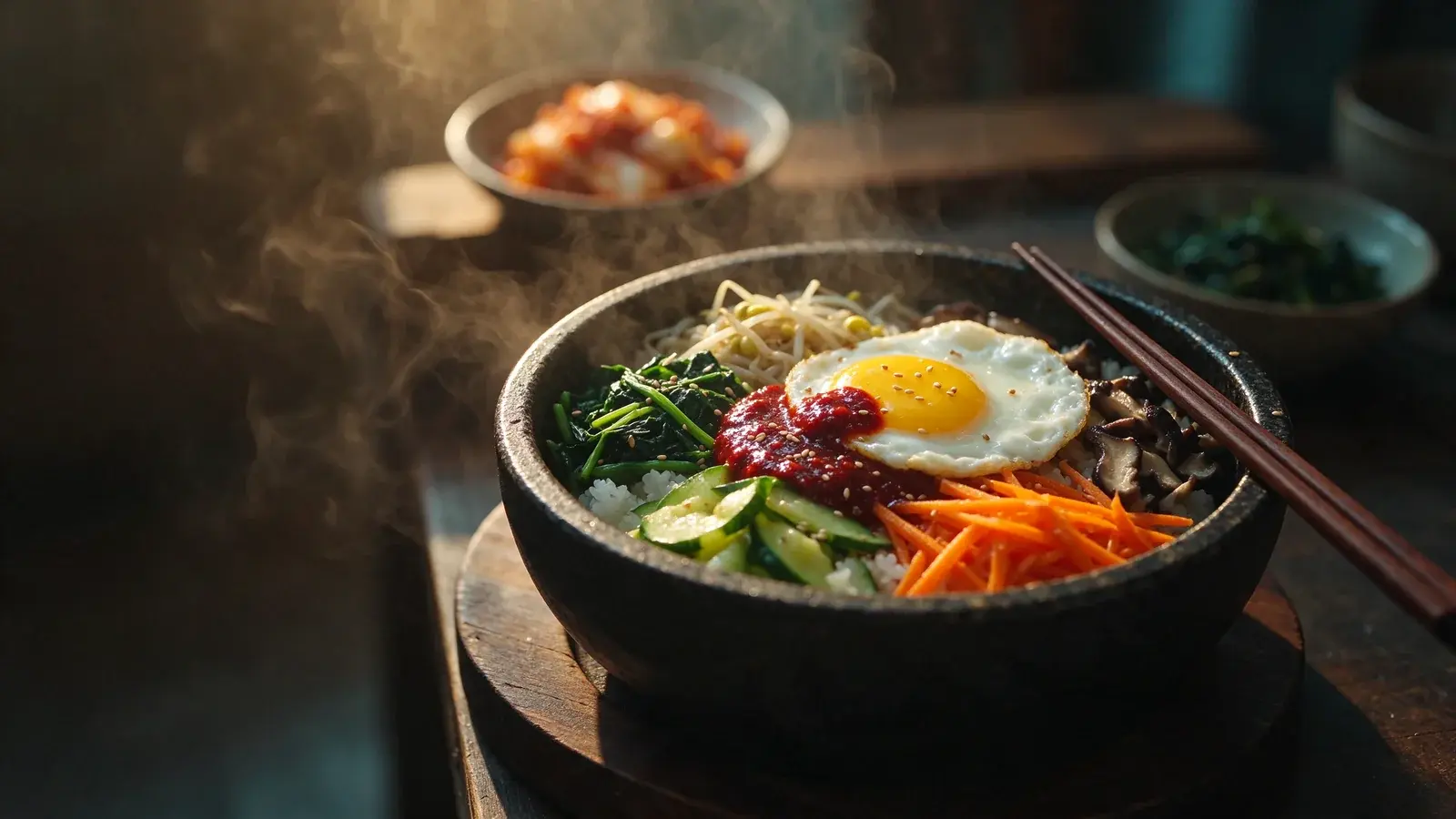
[Subject]     Stone bowl of bibimbap on a dark wooden table, fried egg in the centre
[Motion]      Steam rises slowly, the yolk runs slightly
[Camera]      Slow push-in from slightly above, no cuts
[Light]       Warm side light from the left, like evening sun through a window
[Style]       Realistic food photography, calm, no people in frame
[Avoid]       Text, logos, hands, fast movement
Two rules of thumb to go with it. First: one motion per clip. Steam plus a camera move works; steam plus a camera move plus a hand plus a pan to the counter quickly gets restless. Second: whatever is not in the keyframe should not be demanded by the prompt afterwards. Otherwise the model has to invent it, and the result is hard to predict.
Six fingers and a menu in fantasy script
Now the honest part. AI video is impressive, but it has typical failure patterns you should know before publishing your first clip.
Hands. As soon as hands enter the frame, things get tricky. Typical are fingers reaching through chopsticks, or a hand with one more finger than biology intended. The models are improving here, but for advertising the rule of thumb is: hands only when necessary, and then briefly.
Text in the image. A sign reading “Kimchi” likes to turn into something that looks like Korean but is not. Prices, opening hours, the name of the shop: anything that is meant to be read does not belong in the generation.
Consistency across clips. A typical failure pattern: clip one shows the bowl with sesame, clip two without, clip three suddenly has a different wood grain. This is exactly what the Seedream keyframe is for: if all clips start from the same still, or from variants of it, the world stays stable. According to the documentation, Seedance also accepts up to 50 reference files per prompt – images, videos and audio. So you can use finished clips as references for further clips to support consistency.
And here is the constructive twist that turns the weakness into a workflow: text does not come from the AI, it comes from the edit. That is better anyway, because you can change it at any time without regenerating. With ffmpeg it takes three lines.
Join clips (all clips with the same codec and resolution, listed in clips.txt as file 'clip1.mp4' per line):
ffmpeg -f concat -safe 0 -i clips.txt -c copy roh.mp4Lay text over it, in the house font instead of AI fantasy typography:
ffmpeg -i roh.mp4 \
  -vf "drawtext=fontfile=./fonts/Inter-SemiBold.otf:text='Heute frisch':fontcolor=white:fontsize=64:x=(w-text_w)/2:y=h-200" \
  -c:a copy reel.mp4
And for the website, exactly the three files my homepage expects per card – WebM, MP4 as a fallback and a JPG as the poster image:
ffmpeg -i reel.mp4 -c:v libvpx-vp9 -crf 34 -b:v 0 -an karte.webm
ffmpeg -i reel.mp4 -c:v libx264 -crf 23 -preset slow -movflags +faststart -an karte.mp4
ffmpeg -i reel.mp4 -frames:v 1 -q:v 3 karte.jpg
The -an drops the audio track. Autoplay videos in the browser play muted anyway, and every kilobyte that does not have to travel over the network is a good kilobyte.
What does the fun cost
The honest answer: it costs money and time, just distributed differently than with a classic shoot.
You pay per generation. My own figures, as of November 2026 – please check current prices before your own project: Seedream images cost in the cent range per image. A 30-second draft from Seedance in 480p cost me about 12 US dollars. For 30 seconds in 1080p with four variants, the quote was about 68 US dollars. The rule of thumb that follows: cheap drafts in 480p, the final version in 1080p only once motion and framing are right. Because you generate several variants per shot, plan on roughly double what ends up in the final video.
And time: a clip takes me about six minutes of generation time, and I need two variants on average. A finished reel is about 15 seconds long. On top of that comes my own work: writing prompts, reviewing variants, sorting out, editing. For a business that would otherwise have no videos at all, the maths is still quickly done.
“Made with AI” is no flaw
Back to the grey sentence on my homepage. It is not there out of embarrassment but on principle.
First, the legal side. Since 2 August 2026, Art. 50 of the EU AI Act (Regulation (EU) 2024/1689) applies. The Digital Omnibus (Regulation (EU) 2026/1744) did not postpone it. Under Art. 50(4), deepfakes must be visibly labelled as AI content, at the latest at the first interaction or exposure, in a clearly recognisable way. The obligation lies with the deployer, i.e. whoever creates and publishes the video. A deepfake is a realistic depiction that credibly appears to show something that actually happened. A fictional person in a realistic advertising video can fall under this; a clearly stylised illustration is less likely to. Only the machine-readable marking under Art. 50(2) was postponed, for systems already on the market before 2 August 2026, until 2 December 2026. That concerns the model providers, not you. Violations can lead to fines of up to 15 million euros or 3 percent of worldwide annual turnover. This is an assessment, not legal advice.
Then there are the platforms, as of October 2026. YouTube requires the “AI use” disclosure in YouTube Studio for realistic AI content. TikTok has the “AI-generated content” setting in the post. With Meta, i.e. Instagram and Facebook, you need to distinguish two cases (as of November 2026). For organic posts such as reels and posts, the AI disclosure tool is mandatory as soon as a video is photorealistic or the audio sounds realistic. Leaving it out risks penalties (Meta Community Standards, Misinformation). For ads, no self-disclosure is needed, except for ads about social issues, elections or politics. If Meta detects AI in the ad creative, it adds an “AI info” label itself, under “About this ad” and sometimes next to “Sponsored”, even if the material comes from third-party tools (Meta Newsroom, February 2025).
All three platforms also apply the label themselves when they detect signals such as C2PA metadata. The practical recommendation is still simple: always label videos with AI people yourself, on all three platforms, including Meta ads where the platform does not require it. Art. 50 of the AI Act does not ask whether it is a reel or an ad.
Second, and for restaurants the more important point: the video has to show what ends up on the plate. If the AI bibimbap has twice as much meat as the real one, that is not creative freedom but trouble with disappointed guests – and possibly a case of misleading advertising. That is why the workflow starts with the real phone photo. The AI makes the light nicer, not the portion bigger.
Third: labelling openly takes the tension out of the topic. Anyone who hides it and gets caught has a trust problem that no reel in the world will fix.
What remains
A few years ago, video for a small business meant: book an agency, plan a shooting day, close the kitchen, swallow the invoice. Or simply no video.
Today a good phone photo, a clean keyframe, a prompt in camera language and a bit of patience are enough. The models still occasionally paint six fingers, and they write menus in a language that does not exist. Never mind. Text comes from the edit, hands stay out, and the truth comes from the real plate.
The exciting part is not that AI can make videos. The exciting part is that the small snack bar now has the same tools as the chain with a marketing department.
If you want to try this for your own business: I am happy to build it with you. Labelling included.